PDFium vs PDF.js: Choosing a React PDF Engine (2026)
PDFium vs PDF.js, compared from a React developer's point of view: color and rendering fidelity, performance on heavy PDFs, forms, and which engine fits your project

A few months ago, I opened an architecture layout in a PDF.js-based viewer. It loaded fine. Then I zoomed in, and the re-render lagged. Zoom out, lag again. The page held thousands of vector strokes, and every zoom step seemed to redraw all of them. That's the kind of thing that starts a PDFium vs PDF.js argument in your own head.
Chrome's built-in viewer renders with PDFium, so I opened the same file there to check whether the engine was the difference. It re-rendered smoothly. Later, while researching what PDFium can actually do in a browser, I came across EmbedPDF, which runs PDFium through WebAssembly, and tried the file in that too. Also smooth. That's when I started taking the engine question seriously. And as I dug in, I found the lag traced to viewer zoom strategy more than to the engine itself (more on that below).
Quick disclosure: I work on React PDF Kit, which runs on PDF.js. So I have a side, and that's exactly why I tested PDFium fairly before writing this. If anything, I've overcorrected in its favor.
Most content on this topic is either marketing from companies selling a PDFium-based SDK, or a 2014 benchmark of an early PDFium-to-JS port that beat PDF.js with the text layer switched off. There's no current take from a React developer's point of view. The belief that PDFium just renders better leans on Dropbox's 2017 migration writeup and vendor blog posts, with no neutral in-browser benchmark behind it.
So this isn't a horse race, it's an architecture decision. PDFium's strongest arguments come first here, so don't read the running order as a verdict. The one edge people reliably hand PDFium is color. It turns out PDF.js can match it, through color management that ships but sits off by default behind a setting almost nobody flips on. So PDFium's real advantage is narrower than its reputation: it gets color right with nothing to configure. PDF.js's clean wins are the text layer and bundle size. I'll show you what's verifiable and flag what you should prototype yourself.
What PDFium and PDF.js actually are
You probably know PDF.js already. It's Mozilla's JavaScript PDF renderer, and it parses and rasterizes PDFs in pure JavaScript onto an HTML5 canvas. Nearly every React PDF library sits on top of it: wojtekmaj/react-pdf, @anaralabs/lector, @mikecousins/react-pdf, the archived react-pdf-viewer (phuocng), and the one I work on, React PDF Kit. As of late July 2026, pdfjs-dist is at 6.1.200 (published June 27, 2026), with around 15M weekly npm downloads and 53K GitHub stars. It's the default substrate for React PDF work.
PDFium needs more of an intro, because most React devs have used it without knowing. It's Google's C++ PDF engine, originally Foxit's commercial SDK before Google open-sourced it, and it's the engine inside Chrome, Edge, and Android's PDF viewer. Every time you open a PDF in Chrome, that's PDFium doing the work. It's versioned by Chromium milestone, around 150.x right now, not by npm.
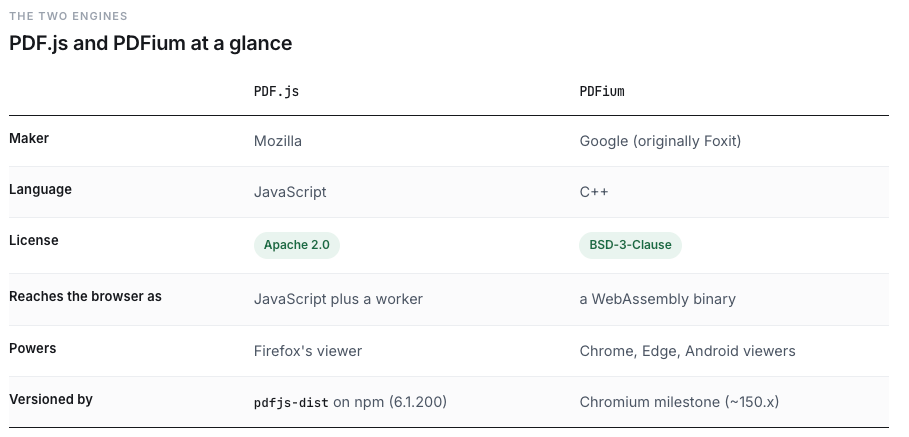
The catch is that PDFium is C++. To run in a browser it has to be compiled to WebAssembly. That one fact is the whole story: one engine is JavaScript that ships as JavaScript, the other is C++ that ships as a WASM binary. Most of the tradeoffs in this piece fall straight out of it.
The library landscape: which engine is under your viewer
Most of the time you don't pick an engine directly. You pick a React library, and it picks the engine. Here's the map.
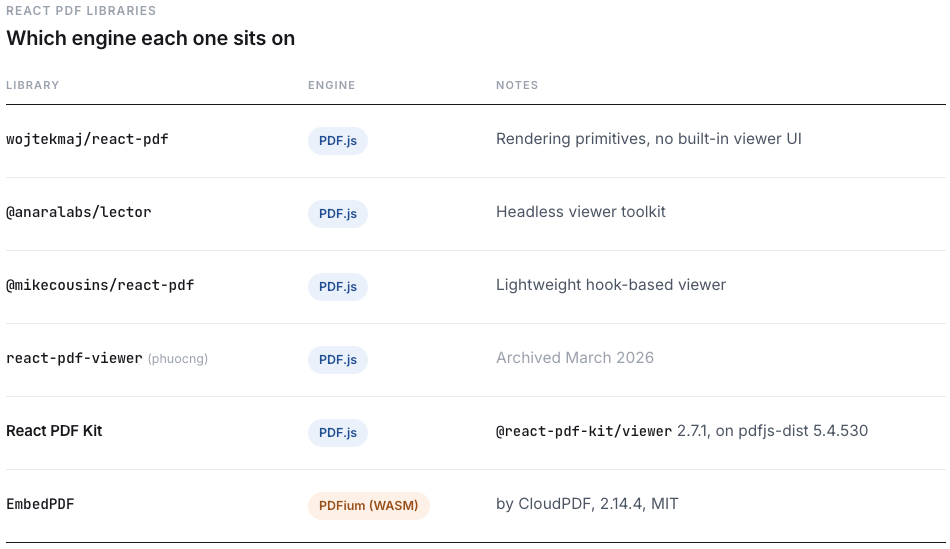
The PDF.js column is crowded because PDF.js is the default substrate for React PDF work. If you want a PDF.js alternative in React at the engine level, EmbedPDF is effectively the production-ready option today, with low-level wrappers like @embedpdf/pdfium and @hyzyla/pdfium underneath it.
Two caveats before you use that table. EmbedPDF is one PDFium-in-React viewer, not PDFium itself, so don't treat "embedpdf react" and "PDFium" as synonyms. And the commercial SDKs sit in their own tier. Nutrient (formerly PSPDFKit) actually runs a PDFium-derived fork, while Apryse (formerly PDFTron) runs its own engine, so "commercial means custom engine" is only half true. I couldn't confirm Syncfusion's engine lineage, so I left it out rather than guess.
For the full feature-by-feature comparison of the React libraries themselves, see our React PDF library comparison on the blog.
Rendering fidelity: fonts, color, and complex graphics
This is the number one reason a team looks at PDFium. It's the engine Chrome ships, so its output matches what users see when they open the file natively, and it tends to match Acrobat on the weird stuff. PDF.js does its parsing and font work in JavaScript, and that's where the gaps show up.
Color and CMYK
Start here, because it's the claim people are surest about, and the one that turns out to be backwards. A quick note on terms, since not everyone works in print. CMYK is the four-ink color model print uses, screens use RGB, and an ICC profile carries a document's instructions for how its colors should map between the two. The reputation says PDF.js can't manage color: it renders in RGB, ignores embedded ICC profiles, and converts CMYK through a rough built-in fallback. That stopped being true in 5.0, when PDF.js bundled QCMS, Mozilla's own color engine, as a WebAssembly module, together with a CGATS001 DeviceCMYK reference profile. That is real ICC color management. It's just off by default.
Two getDocument options switch it on. wasmUrl turns on the ICC path for embedded profiles, so ICCBased streams run through QCMS instead of the old alternate-colorspace fallback, the embedded-profile gap that issue #2856 tracked for years. iccUrl goes further and routes DeviceCMYK through an ICC transform against the CGATS001 profile rather than a polynomial approximation, which is the imperfect default conversion a Mozilla maintainer described in issue #8500. Both of those long-standing complaints describe the default path, and the ICC path is what closes them.
The gap is easy to measure and easy to see. Open a CMYK-heavy file in a stock PDF.js viewer next to Chrome's native one, and the colors are visibly off. On a DeviceCMYK swatch file, default PDF.js on 5.4.530 (the build tested here) is off from Chrome's PDFium by as much as 60 out of 255 on a single channel. Turn the ICC options on and the same build comes within 3 out of 255, down at the level of screenshot sampling noise. So the color difference people blame on the engine is really a config default, not an engine limit. For marketing collateral, print proofs, packaging, or spot-color design files, that drift is the kind of error that surfaces only when the printed piece comes back wrong. And the fix is a few lines of config.

PDFium's color story is narrower than its reputation too, and it's worth stating fairly. It matches Chrome because it is Chrome's engine, through an internal C++ CMYK-to-RGB path rather than app-layer color management. The browser viewers built on it pass that output straight through, so there's no separate ICC pipeline doing the work. What PDFium gives you is correct color with nothing to set up. That's a real convenience, but it's parity by default, not something PDF.js can't do.
Turning it on, and the trap
Setting wasmUrl and iccUrl does nothing on its own. The ICC path only activates when PDF.js is cleared to fetch worker assets, and that clearance turns on only if cMapUrl, standardFontDataUrl, and wasmUrl are all set and all resolve to valid fetch URLs against your document base. Leave out standardFontDataUrl and the color options are ignored in silence, no error, and no warning unless you've raised the verbosity level. A working call passes all of them:
pdfjsLib.getDocument({
  url,
  cMapUrl: '/pdfjs/cmaps/',
  standardFontDataUrl: '/pdfjs/standard_fonts/',
  wasmUrl: '/pdfjs/wasm/',
  iccUrl: '/pdfjs/iccs/',
})
One last catch: those paths resolve inside the worker (the background thread PDF.js does its parsing in), not on the page. A relative URL there is taken relative to the worker script, not your page, so it quietly points at the wrong place. Pass absolute URLs instead. None of this is documented, so you only find it by reading the source, and it's easy to get half-right. That is the real reason so few PDF.js viewers turn color management on, not any missing capability.
Fonts and CJK
PDF.js converts and sanitizes embedded fonts in JavaScript, which is where its edge cases live: missing glyphs in Source Han Sans (#5377), type3 font bugs (#19634), a CJK glyph regression (Bugzilla 1146106). If your documents are CJK-heavy, PDFium lands closer to Acrobat more often.
But most everyday PDFs render fine in PDF.js. Mozilla's own benchmark treats the badly-broken cases as unusual files. And not every difference is the engine's fault. Issue #19221 is a font error that also breaks in Adobe Reader, because the PDF itself is malformed.
The gap is a moving target
One more thing on fidelity, and it cuts against my own anchor. PDF.js 6.0 shipped on May 30, 2026, and it landed work in exactly the areas where PDFium historically led: CID and CJK font recovery, Adobe-parity hinting, and knockout and soft-mask transparency fixes. Those are the CJK and obscure-feature gaps, narrowing in a single release.
So the gap is real today, but it's a trajectory, not a constant. PDFium moves too, with every Chromium milestone, so "date your comparison" cuts both ways. The full v6 rendering story deserves its own write-up, and that one's coming.
Rendering performance on heavy and complex PDFs
The first question is usually which engine is faster. It depends on your documents, and I'll get to why the public evidence can't settle it. What you feel right away is how each one copes with a heavy document, and it doesn't take an exotic file. An ordinary layout-heavy PDF with many elements and text runs is enough to make any renderer sweat. Past that sit the hard cases: CAD and architectural exports with huge path-operator counts (PDF.js #14652), large-format pages with dense vector linework, files with many optional-content layers that cost parse time even when hidden, and multi-hundred-page scans.
Here's the correction to my own first take. I'd assumed PDF.js re-renders the canvas on every zoom step and therefore lags. That's an oversimplification. Zoom smoothness depends on the viewer's zoom strategy more than on the engine.
Some PDF.js viewers apply a cheap visual scale during the gesture and defer the sharp re-render until you let go, which feels smooth even on dense pages at the cost of a moment of blur. Others re-raster at every step, staying sharp throughout but lagging on complex documents. PDFium viewers pair native or WASM rasterization with virtual scrolling and tiling, which reads as responsive, but they pay the same cost re-rasterizing dense vector content at high zoom.
That's what I was actually seeing in my architecture layout. It painted fine, then lagged on every scale change in one PDF.js viewer. The same file zoomed smoothly in Chrome's native PDFium, in EmbedPDF, and in the hosted PDF.js demo. The demo isn't getting that for free from the engine. It CSS-scales the existing canvas during the gesture and defers the sharp re-render until about 400 ms after you stop zooming, while the viewer I started in re-rasterizes on every step. Same engine, opposite feel. What I hit was a viewer-configuration gap, not the PDF.js engine failing to keep up.
The strain underneath is still real. Canvas trouble on complex pages is a known PDF.js limit (issue #7265). Teams used to reach for the SVG backend as an escape hatch, but it never really worked and has since been removed. Apryse's 2019 benchmark, from a vendor selling a competing engine, found CAD exports from GrabCAD failing to open or crashing the browser as often as 1 in 10. That's a limit on what's practical in a browser without careful viewer engineering, whichever engine you pick.
And this is where the evidence gets thinnest. Dropbox's famous result, halving 75th-percentile Time to Interactive, was server-side PDFium-to-PNG in 2017, not in-browser WASM. The 2014 microbenchmarks disabled the text layer. So I won't tell you PDFium is faster. On heavy PDFs the lag comes from how the viewer is built, not the engine underneath.
Test what matters to you instead:
- Gather your heaviest files: CAD and architectural exports, large scans, layer-heavy documents.
- Open each one in every viewer you're considering, and zoom in and out repeatedly on the densest areas.
- Time how long it takes to get from the gesture to a sharp render, and watch memory on long scrolls.
- Check it on real target hardware, not just your dev machine.
Forms and form fidelity
The assumption going in is usually "PDFium does forms better." It's mostly a wash, with one persistent myth worth clearing up.
AcroForms work on both. PDF.js added AcroForm rendering in Firefox 84 and form JavaScript in 88. PDFium renders and fills them with Chrome and Acrobat fidelity, plus signatures. For the forms you'll actually run into, there's no real gap.
XFA is the part people get wrong. The naive line, "PDFium can't do XFA," is false. PDF.js renders XFA out of the box at the viewer layer (Firefox 93). On the PDFium side it's a build-flag and implementation choice. Chrome's shipped PDFium disables XFA, but the engine has the module and EmbedPDF's own WASM compiles it in. I checked: FPDF_LoadXFA and the XFA packet functions are exported in EmbedPDF's pdfium.wasm. Its plugin just doesn't surface XFA in the UI. So PDF.js gives you XFA rendering for free, and on PDFium the engine has it but you'd wire it up yourself. Not "PDFium can't."
One note on React PDF Kit. The library ships AcroForm only and skips XFA, even though PDF.js the engine could render it. Don't read "PDF.js renders XFA" as "React PDF Kit renders XFA."
But XFA barely comes up anymore. It's deprecated, removed from the PDF 2.0 spec and excluded from PDF/A, surviving only in legacy government, banking, and legal forms. If you don't have XFA, none of this matters. If you do, PDF.js is the lower-effort path. Neither engine is a form-authoring SDK. That's Nutrient, Apryse, or Syncfusion.
Where PDF.js pulls ahead: bundle size, text, and accessibility
The last few sections leaned PDFium's way or came out even. This one doesn't. PDF.js leads on the pieces a viewer is actually made of.
Bundle size and load model
PDF.js is the lighter default, and more of its weight is deferrable. You ship the display layer plus a worker. Reported sizes put the minified display layer around 299 KB (issue #9087), and a source-map breakdown puts it near 840 KB display plus 699 KB worker uncompressed, so roughly 1 to 1.5 MB before gzip, and less over the wire. The CJK cmaps and standard fonts load on demand through cMapUrl and standardFontDataUrl. You don't pay for them unless a document needs them.
PDFium is a fixed cost. It's one WASM binary, fetched and instantiated up front, the same size no matter how simple the document. I measured EmbedPDF's pdfium.wasm at 4.63 MB uncompressed, around 2.1 MB gzipped over the wire, fetched from a CDN by default, plus a one-time instantiation cost on cold start. There's no on-demand splitting of the engine itself. It caches after first load and stays constant, which is the upside, but the up-front number is real. If first paint matters in your app, PDF.js starts lighter.
Text, search, and accessibility
This is the quiet, decisive one. PDF.js builds a transparent text layer of positioned spans over the canvas. That gives you real selectable text, in-document search that maps to actual glyphs, and tagged-PDF accessibility for screen readers, which landed in Firefox 89. Those are the features you build a viewer around.
PDFium hands you none of that in the browser. Dropbox noted that text extraction and positioning were trickier with PDFium than with PDF.js. pdfium-bugs #1523 is a screen-reader user flagging missing selection support. EmbedPDF rebuilds its own text and selection layer on top of PDFium to fill the hole, which works, but it's work the viewer has to redo that PDF.js gives you for free. If you want to understand how this layer actually works, we covered PDF.js layers in a separate article on the React PDF Kit blog.
A smaller security surface
PDF.js runs as ordinary JavaScript using only normal web APIs, so its attack surface is small and browser-standard. PDFium is C++, with the usual memory-safety bug class and historically a larger surface, mitigated by Google's continuous updates, sandboxing, and the browser's WASM sandbox. Both engines restrict the Acrobat JavaScript APIs, and both run client-side now, so files don't have to leave the device.
What this means in a React project
Engine choice eventually becomes a setup choice. This is what each one actually looks like in React and Next.js.

On the PDF.js side, you need pdfjs-dist and a configured worker. React PDF Kit handles the worker for you. It sets GlobalWorkerOptions.workerSrc to a bundled worker file behind a window guard, and lets you override it:
import * as pdfjs from 'pdfjs-dist'

if (typeof window !== 'undefined') {
  const defaultWorkerUrl = new URL(
    'pdfjs-dist/build/pdf.worker.min.mjs',
    import.meta.url
  ).href
  pdfjs.GlobalWorkerOptions.workerSrc = workerUrl || defaultWorkerUrl
}
The viewer's entry components are marked 'use client', so in Next.js App Router you load it as a client component. When something breaks, you debug it with normal JavaScript stack traces in devtools. That's underrated.
On the PDFium side, EmbedPDF boots the engine through a hook. usePdfiumEngine() fetches and initializes the PDFium WASM (from a CDN by default, with a worker: true option), and you hand the engine to a provider:
import { EmbedPDF } from '@embedpdf/core/react'
import { usePdfiumEngine } from '@embedpdf/engines/react'

function App() {
  const { engine, isLoading, error } = usePdfiumEngine()
  // register plugins: viewport, scroll, render, tiling, search, selection
  return (
    <EmbedPDF engine={engine} plugins={plugins}>
      {/* Viewport with render, search, and selection layers */}
    </EmbedPDF>
  )
}
The manual C-style memory model PDFium is known for (malloc/free, FPDF_LoadMemDocument, FPDF_GetLastError) is real, but it lives inside the library. App developers use usePdfiumEngine, not raw memory.
One misconception to clear up: both of these are client-only in Next.js, but the mechanism differs. React PDF Kit uses 'use client'. EmbedPDF uses typeof window guards plus dynamic imports. SSR-skipping isn't a PDF.js-only tax. The real difference is a worker file to resolve versus a WASM binary to fetch, which is a different problem, not a harder one in absolute terms.
If you're on PDF.js and don't want to reimplement worker config and the client-only wrapper for the hundredth time, that's the gap React PDF Kit fills. It's tailored for React, and it's built to save you the weeks that the worker setup and the surrounding viewer features usually cost.
PDFium vs PDF.js: how to choose
Pick PDFium when:
- You need Chrome and Acrobat color parity with nothing to configure. PDF.js can match it, but only once you wire up its ICC options, so if you don't control the viewer's config, PDFium gets you there by default.
- Your documents are CJK-heavy, or lean toward construction, large-format, or technical drawings where Acrobat parity is the explicit bar.
- You're shipping a document-review tool where a wrong color or a dropped glyph is a real problem. PDFium earns its WASM payload here.
Pick PDF.js when:
- You want the broader ecosystem and JavaScript-native debugging, the path nearly every React PDF library already takes.
- The mature text, search, and accessibility layer matters more to you than fidelity on the cases above.
- Color-critical work doesn't force you off PDF.js by itself. The ICC path ships in 5.x, so you can turn on color-managed CMYK when you need it, as long as you clear the config trap above.
Two honest footnotes:
- v6 isn't a free upgrade. PDF.js 6 raises the minimum supported browser versions even in its legacy build, so staying on the 5.x line is a real fidelity-versus-browser-support tradeoff.
- The comparison dates fast in both directions. Even Dropbox, whose 2017 migration anchors a lot of the received wisdom here, has since moved its previews off PDFium to a commercial SDK.
One honest caveat before you commit: Forms are a nuance, not a clean win for either engine, and even color, the one edge this piece let PDFium keep, turns out to be a PDF.js setting that ships off by default rather than a missing capability. The "PDFium just renders better and faster" reputation rests on dated and vendor evidence with no current neutral benchmark behind it. So don't take my word for it or theirs: prototype both engines on your trickiest documents and see what actually differs.
If you're staying on PDF.js and want the viewer layer handled instead of rebuilt, React PDF Kit's docs and live demos are at react-pdf-kit.dev.
And put a date on whatever you decide. PDF.js ships roughly once a month and PDFium tracks Chromium, so there's no permanent answer here, only the right one for your documents on today's builds.